The Freedom Clock is a calm little screen for your desk. No prices, no notifications, no badge counters. It just sits there and quietly answers one question:
How much of your life have you already bought back?
Your savings are a number.
What if they were a feeling?
Most money apps answer the wrong question. They show you what you have. Your balance, your return, your net worth. But you don't wake up thinking about your net worth. You wake up wondering whether today is a day you chose, or a day that was chosen for you.
The Freedom Clock answers the question your gut is actually asking: if I stopped earning tomorrow, how long could I keep living the life I want? The answer shows up in years and months, not dollars. It's on your desk every morning, without you opening anything.
Freedom isn't a finish line. It's a direction. The number tells you which way you're heading.
And freedom was never about escaping work. It's about earning the right to choose it.
Freedom time is the number of years and months your savings, Bitcoin, and other assets could support your current monthly spending without new earned income. It answers the plain question: if I stopped earning tomorrow, how long could I keep living the life I want?
Freedom Clock is an open-source ESP32 e-ink desk device and free in-browser calculator that converts savings, Bitcoin, and fiat assets into freedom time: the number of years your current lifestyle could continue without earning.
The calculator runs in the browser, the device on your local network. The point is not to watch markets minute by minute; it is to make one long-term personal finance question visible enough that you can make calmer decisions.
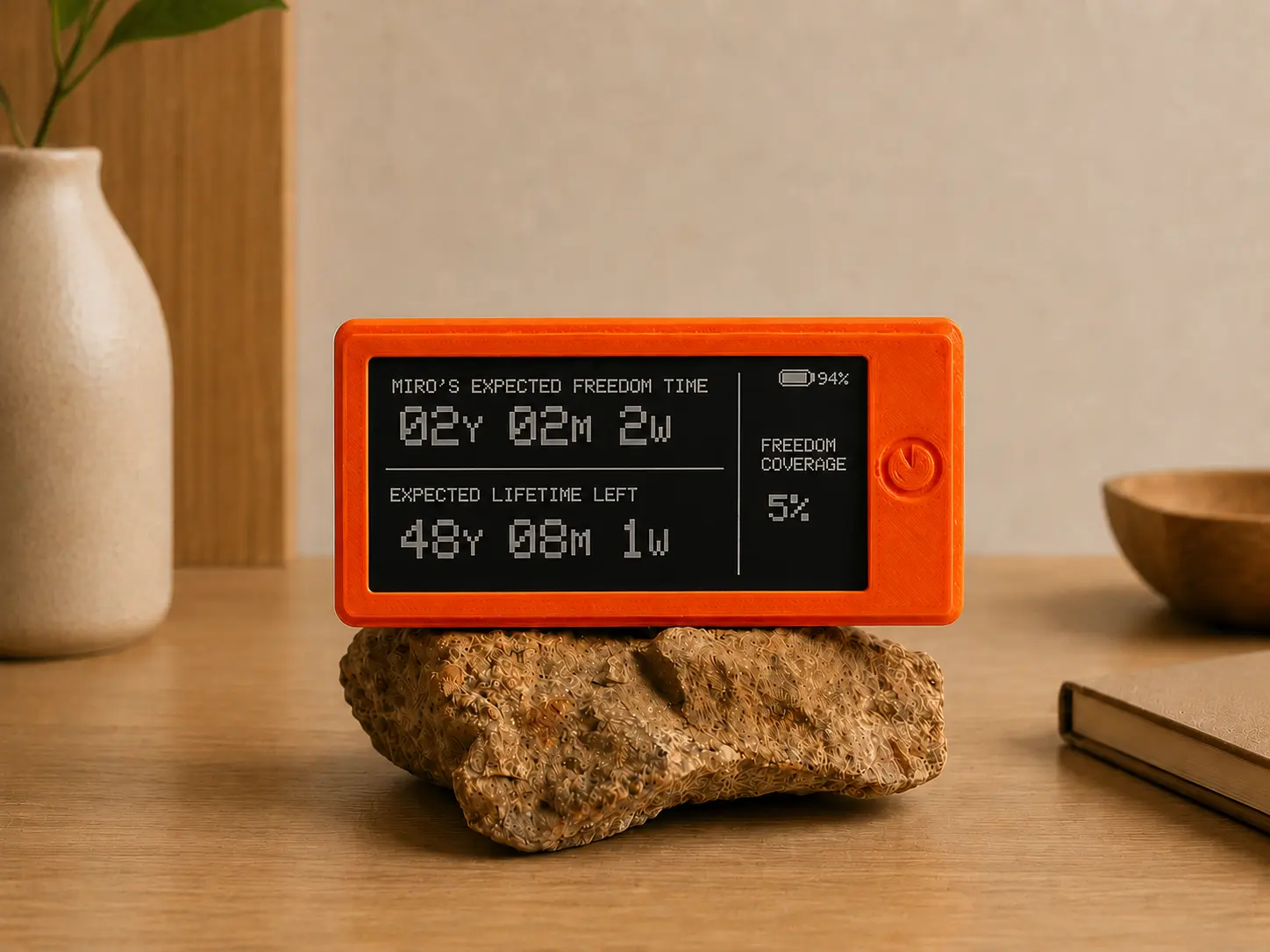
The main screen is intentionally simple, so you can read it in one glance. We call this your freedom time — a single number you'd otherwise need a FIRE spreadsheet or Bitcoin lifestyle calculator to compute.
How long your savings could carry your chosen lifestyle, in human units. Not dollars. Not blocks. Time.
A quiet memento mori. Even if the portfolio keeps growing, this clock keeps moving. Are you using the time well?
What percentage of the life you have left is already financially covered. A single number that closes the gap, week by week.
All numbers stay in your browser. Nothing is sent anywhere. Use it as a private FIRE calculator, a Bitcoin retirement calculator, or just a sanity check on how far your savings already reach.
The trick is not to spend a lifetime trying to outrun the clock that's already on your desk.
Between glances at your freedom number, the screen surfaces a short line worth thinking about. From Seneca, Perkins, Housel, Naval, and many others.
It's not a dashboard or a notification. It's a small local-first financial tool that lives in your peripheral vision and asks one good question whenever you happen to look at it.
Updates in cadence with your life, not the market. Days, not seconds. Battery lasts months.
No phone, no login, no doom-scroll. You glance at it, the way you'd glance at a window.
Runs on your home Wi-Fi. Numbers never leave the room. Your finances are no one's business.
Open hardware, open code, MIT licensed. Re-skin it, re-purpose it, or build one as a gift for someone you love.
You don't need to be a developer. You don't need to solder. The DIY Bitcoin clock build runs on a Heltec Vision Master E290 e-ink board, and the hard parts (the software, the math, the layout) are already done.
One small e-ink board, a battery, a USB-C cable. Total around $30 from your favourite electronics shop.
Download a file from the GitHub page, plug the device into your computer, hit upload in the Arduino IDE. One click.
Open the device's setup page on your phone. Type in what you save and what you spend. Save.
Set it next to your monitor, your coffee, your reading chair. Glance at it every now and then. Notice what changes.
| Heltec Vision Master E290 | ~$22 |
| 3.7V Li-Po battery, ~1000mAh | ~$5 |
| USB-C cable | ~$3 |
| A stand of your choice (3D printed case, wood, stone ...) | $0 |
No. You can enter savings, real estate, stocks, or any mix of assets in USD, EUR, GBP, CHF, CAD, or AUD — each with its own growth rate. Bitcoin is fully supported and can be combined with other assets in the same portfolio. Bitcoin was the original spark, but the device cares about freedom, not the asset class.
It's a thoughtful estimate, not a guarantee. That's why there's a Details screen that shows every assumption behind the calculation — real return, spend rate, and whether your portfolio is self-sustaining. Change one of the inputs and the number adapts. The point isn't precision. It's the conversation it starts.
When your portfolio's real annual return (growth minus inflation) covers your annual spend without touching the principal, your money lasts indefinitely. At that point the clock shows FOREVER and coverage shows INF. You can see exactly why in the Details screen — if your "real return" percentage exceeds your "need rate" percentage, you've crossed that line.
Nowhere. The device runs on your local Wi-Fi, talking only to your service (optional). No accounts, no cloud, no analytics. Even this calculator runs entirely in your browser. The only external call is to CoinGecko for a live BTC price if you switch to BTC mode.
Yes. The hard parts are done. You install one program (the Arduino IDE), open a file, and click upload. The README walks you through it in plain English, and there's a Discord if you get stuck.
Because phones are noisy. The Freedom Clock is meant to be glance-able and unobtrusive: a physical reminder, not another notification fighting for your attention. The medium is the message.
Between updates of your freedom number, the screen rotates a small library of short lines worth re-reading: on time, on attention, on what enough looks like. You can edit the list, replace it with your own, or turn it off entirely.
It can be used as one. The calculator supports Bitcoin holdings alongside fiat assets and offers three spend models: sell monthly, borrow against, or borrow-then-sell. The result is your freedom time — how many years your savings could carry your lifestyle.
The desk device runs on a Heltec Vision Master E290 (2.90″, recommended) or E213 (2.13″) e-ink board, a 3.7 V Li-Po battery, and a USB-C cable. Parts cost around $30. The code is open source under the MIT license.
Your time is the only currency that doesn't compound.